

Clinical AI engineering · Cairo

Medical AI built for your clinical workflow.

We engineer medical AI end to end: the models, the imaging pipelines that run them inside the hospital network, and the full-stack applications clinicians and care teams actually use.

Clinical AI pipelinesFull-stack appsDICOM & PACSFHIR & HL7Segmentation & detectionOn-prem inference
Source
Partners

Who we built with

Clinical teams and technology partners helping move medical AI into practice.

Selected work

What changes for the clinical team.

Each project in plain terms: the task, what we built, and what comes out at the end.

04 projects
Pipeline visual

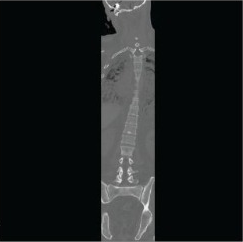
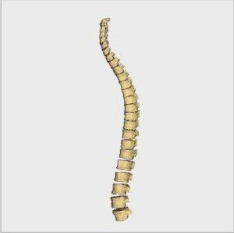
From CT volume to labeled spine outputs

3D Slicer module
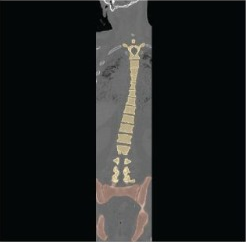
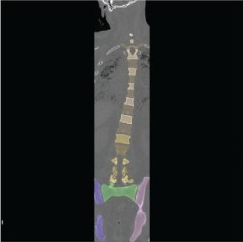
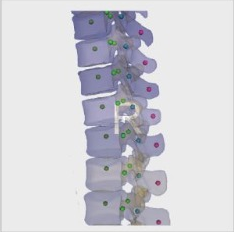
Stage 2Vertebra detection3D Volume: coronal CTStage 1: initial segmentation of spine and pelvisStage 2: vertebra detection
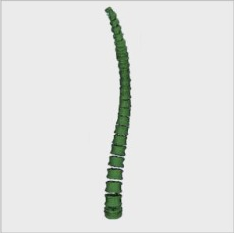
3D outputs
Body 3D outputBody
Body + Pedicles 3D outputBody + Pedicles
Center of mass 3D outputCenter of mass
  1. 013D VolumeInput · coronal CT
  2. 02Stage 1Initial segmentation
  3. 03Stage 2Vertebra detection
  4. 04OutputsThree 3D results
The highlighted step is the current pipeline stage.
01 · Case study
3D Slicer moduleCTSegmentation

Multistage AI pipeline for spine segmentation

Surgical Works · 3D Slicer module · CT

The task
Segment the full spine on CT and identify each vertebra.
What we built
A multistage AI pipeline running as a 3D Slicer module.
The result
Three 3D outputs per case: Body, Body + Pedicles, and Center of mass.
Workflow
CT → 3D Volume → Stage 1 → Stage 2 → 3D model in Slicer.
Read the case study
02 · Case study
OHIF integrationCTWorkflow

End-to-end full-spine segmentation in OHIF

QubX3D · OHIF integration · CT

The task
Make full-spine segmentation available where radiology teams review cases.
What we built
An end-to-end segmentation pipeline with OHIF integration.
The result
Full-spine segmentation available in the OHIF review workflow.
Workflow
CT study → AI segmentation → OHIF review.
Read the case study
03 · Case study
Cloud deploymentREST APIGPU containers

Multi-user GPU cloud platform

Surgical Works · Web app · REST API · GPU containers

The task
Let the whole team use a GPU desktop application without installing it on every workstation.
What we built
A web app, backend and worker that start one GPU container per user running the client's Linux 3D application.
The result
One central deployment instead of many workstation installs.
Workflow
Log in from the browser → GPU container per user → 3D application streamed back.
Read the case study
04 · Case study
PACSOHIFInvestigational use

PACS with a DICOM viewer, supported by AI models

CUBE.AI · PACS · OHIF · Investigational use

The task
Run AI workflows from queued PACS studies inside a familiar review workflow.
What we built
A PACS workflow with DICOM viewer support and AI model services.
The result
Study triage, model execution, and review in one workflow.
Workflow
PACS queue → DICOM viewer → AI model result.

Investigational use only. Demonstration of the software workflow.

Read the case study
AlsoFour code examples on Valohai's GitHub showing their MLOps integration with NVIDIA NIMs (MONAI, TAO, NeMo).View on GitHub
What we do

Everything between the model and the clinician.

05

Radiology reporting software

Report generation workflows connecting image review with the reporting clinician.

ReportingReviewSign-off
06

Startup acceleration

Extra engineering capacity to build, validate and ship medical AI products.

Co-developmentPrototypingScale-up
Clinical approach

A clear scope. Evidence you can review.

Our portfolio shows engineering work across imaging pipelines, clinical viewers and full-stack applications. Each engagement needs its own intended use, evaluation and deployment plan.

Define the intended use

Start with the clinical task, the users and the decisions the software will support. Agree the evaluation criteria before development.

Evaluate with clinicians

Plan held-out evaluation and clinician review around your data and workflow. A working demonstration is a starting point for evaluation.

Agree the data boundaries

Scope hosting, data access, de-identification and retention with your team before transferring project data.

Discuss data and deployment requirements
How we work

From clinical question to deployed system.

Every engagement runs the same four stages, whether it is a single model, a full-stack app or a hospital-wide integration.

01 · Scope

Scope

The clinical question, the data you have, and the systems the result has to reach.

02 · Prototype

Prototype

A working model and app on your own data, early, so decisions are made on real output.

03 · Validate

Validate

Held-out evaluation and clinician review before anything goes near a workflow.

04 · Deploy

Deploy

Pipelines and apps shipped into your infrastructure and workflow, with monitoring once live.

All-in-one, built around you

One system, tailored to how you work.

You don't need a model, a viewer and an integration from three vendors. We assemble the frontend, backend, AI services and integrations your team needs into one system, and leave out what it doesn't.

Frontend
Backend
AI services
Integration
Your system9 / 16 modules
Radiology team9 of 16 modulesIn-hospital inference, PACS routing and the viewer your radiologists already work in.

Radiology team setup includes DICOM viewer, Worklist, APIs & auth, Audit trail, Segmentation, Model serving, DICOM C-STORE, DICOMweb, PACS routing. Available to add: Dashboards, Patient portal, Job queues, Deployment, Detection, Monitoring, HL7 & FHIR.

Tailored for
System modules · illustrative
  • FrontendViewer and worklistCan be configured
  • AI servicesVersioned inferenceCan be configured
  • IntegrationDICOMweb and FHIRCan be configured
Start a project

Plan your medical AI project with us.

We work with radiology teams, medtech startups and healthcare companies across Europe and beyond, from Cairo, Egypt.